
Video Claims Management
Claims solution service
Make car claims feel more convenient than before. With a mobile phone, car owners can request claims from anywhere. We provide motor claim services to assist insurance companies in lowering costs, increasing operational effectiveness, and improving user satisfaction.
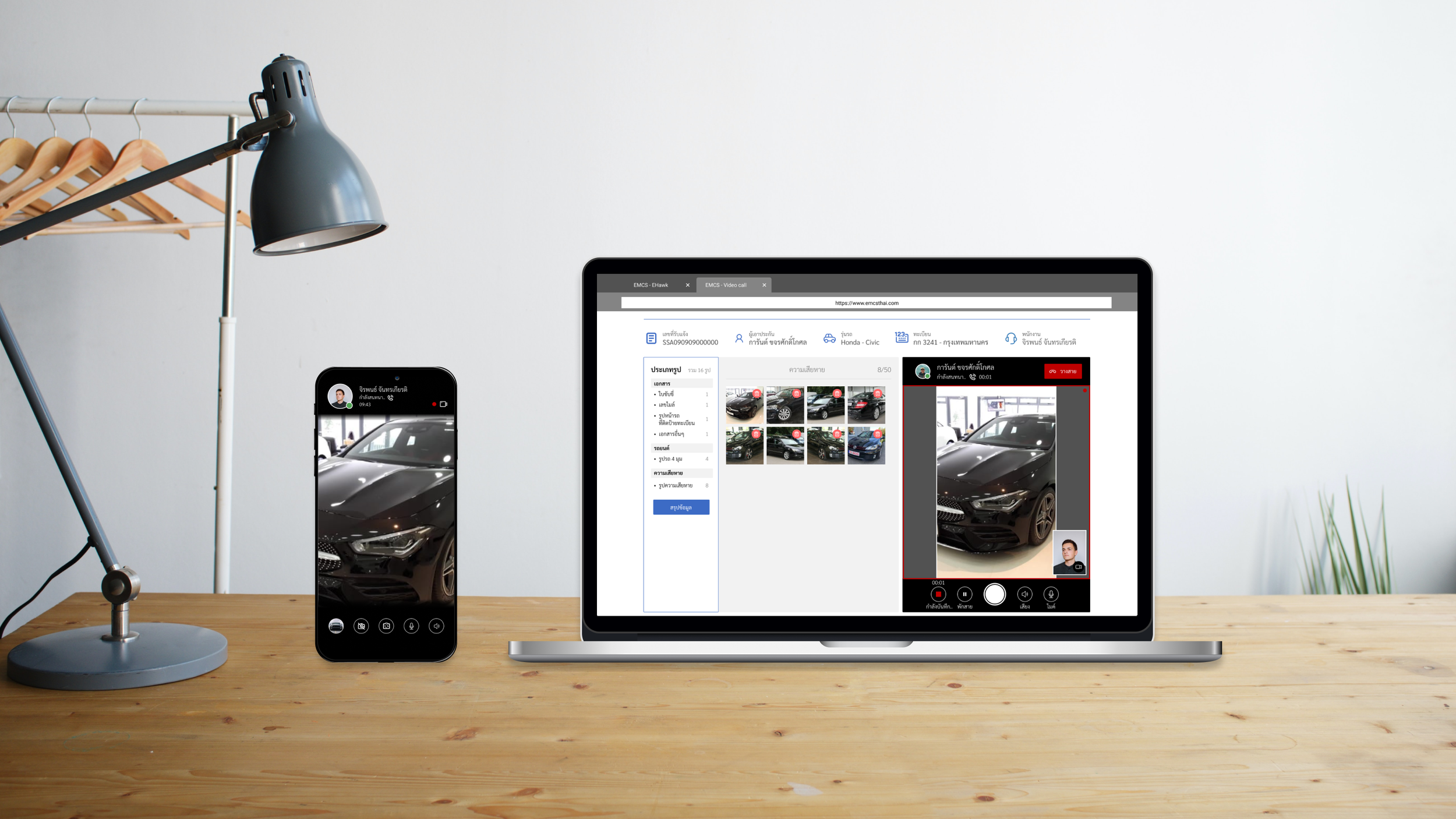
My Team
Members :
1 person
My roles :
Customer Experience Designer
User Interface Designer
Researcher
Deliverables
Research
Persona
Customer journey
Design system
Low-fidelity prototype
Hi-fidelity prototype
Usability testing report
Specifications
System
Web application
Project duration :
3 weeks
Tools :
Figma
Miro
Adobe Illustrator
Overview
In the traditional way, the Inspector has to go to check the incident to inspect the car damage and approve a claim. If the third party is still there, it’s a fresh claim, if not, this claim will be a dry claim. This project focuses on dry claims. At present, dry claims have been changed to “online claims”.
To reduce the time to request a dry claim, we will provide a service in which users can book a time to request an online claim at a convenient time using video conference technology and an inspector will guide them to take a photo of the car damage. The users don’t have to wait for an inspector which reduces time consumed when requesting a claim.
To precisely detect damages on a car, an inspector has to clearly see the damage and list those damages to approve a claim. These days, smartphone cameras give better photos and videos than in the past. Many insurance companies have used this method to improve their self-claiming services because this can reduce time in the claiming process efficiently.
This is another option for requesting an online claim besides taking a photo by oneself in the LINE OA project, but this method is for the user who needs a personal guide or interacts with an insurance company for lesser human error.
*This project’s requirement came from the marketing team, they need to create a video conference claiming to compete in the market.
Problems
Some human errors still exist and there are problems when doing an online claim.
There are errors when requesting an online claim by taking a photo by oneself in some people that make the process slow and waste time.
It’s difficult for anyone who is unfamiliar with a claiming service to request a claim.
People who use online claims are worried about doing something wrong during a request.
Expected Solutions
Reduce the complexity of requesting claims by using another technology to help, called video conference.
Let an inspector talk with a user and guide them through the claiming process.
Implement AI technology for estimating damages from photos and reducing workload for inspectors.
Knows More About The Problems
Some insurance companies have introduced a video conference claiming service called “Video Call” but after I researched those services, there are some issues that need to be mentioned. They lack convenience, the service has errors sometimes, or even slow response in some devices. I needed to find out more about it by conducting an interview with users.
An interview
I decided to get an interview with colleagues who have experienced claiming by video conference. Since this project had a tight time limit I had to do it as fast as possible, So finding participants from nearby people is the fastest option.
Participants
I had 2-3 participants whom I could have an interview with. and they have a qualification below.
A person who uses a car frequently.
They have their own car insurance.
Experienced a video conference claiming service.
Questions
The questions were about the process of video conference claiming service and the procedure that users have experienced from start to end.
Some of the questions.
Where do you hear about video conference services from?
What is your expectation when using this claim method?
Please tell me about the whole experience of using this service.
Any problems that occurred while using a video conference claiming service?
Analyze The Problems.
I got enough feedback and suggestions from an interview with colleagues to work on. Those ideas were grouped for discussion with stakeholders for further feedback on my research.
The concerned points that I found.
Knowledge of a car parts’ name.
Problems with claim documents.
A poor signal while doing a video conference.
They didn’t know about the photos that they had taken so far.
Competitive Audit
In Thailand, an insurance company that can make claims by video conference service is Viriyah's Vclaim on Vcall. This is marked as a direct competitor.
From their product, there is an employee video portrait that makes the user feel relieved with insurance. The call center side can also make gestures to interact with the car owner when a voice call can't be described well enough.
However, the interface and typography can be hardly seen in the day-times due to the use of white text on a background with no contrast.
Create a Persona
This persona was created from the information and suggestions that I got from an interview. Our participants shared their lifestyle, daily routine, their frustrations, etc. which were a good source for creating a lively persona. This would be an ideal user for our claiming service.
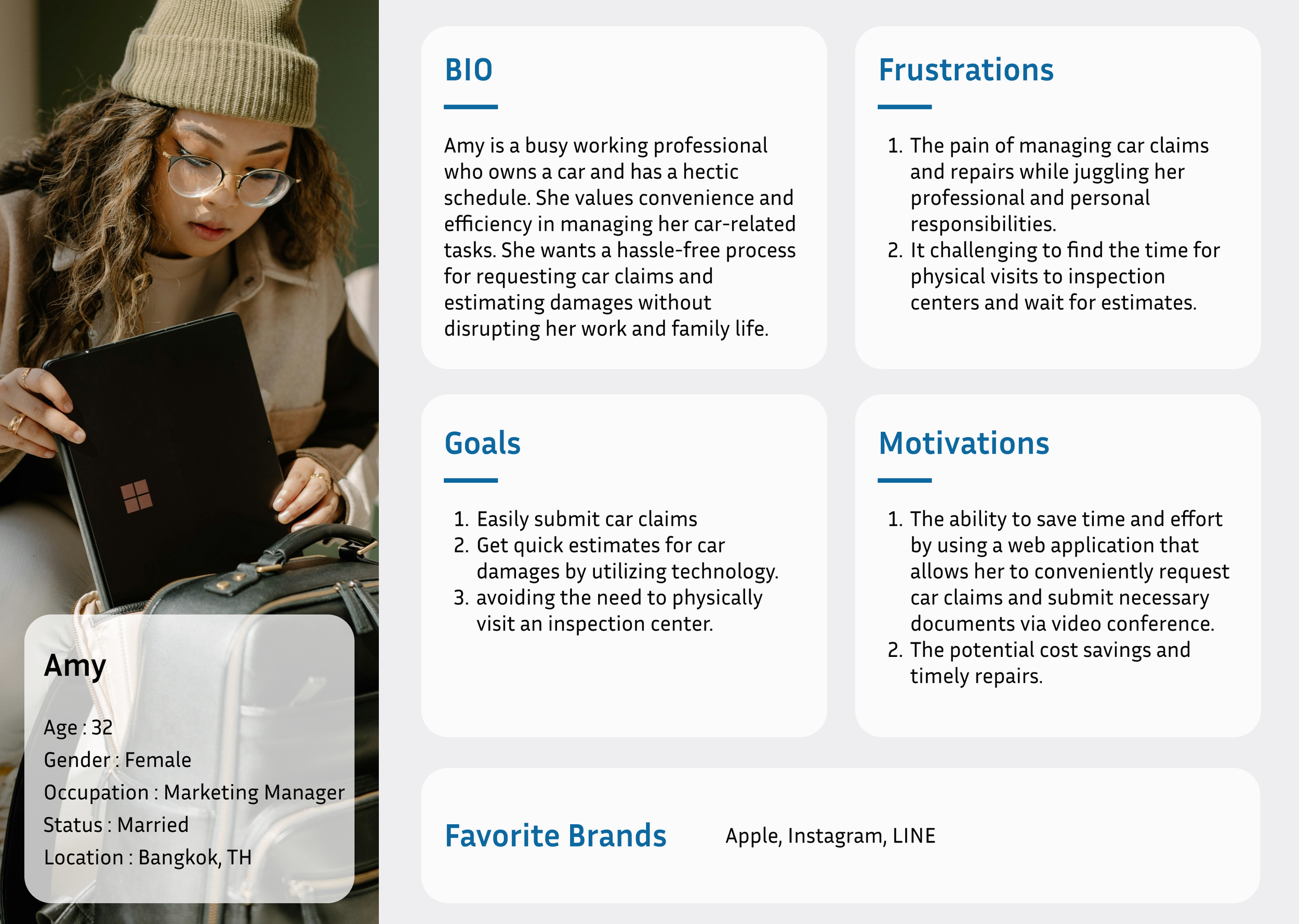
Amy always busy and pay attention to time.
The Storyboard Helps Illustrate The Ideas
It was difficult to do this alone, but quite challenging at the same time.
It was rather challenging for the ideation phase, so I planned to make my stakeholders understand a customer journey and also gather feedback from them simultaneously. According to this, I decided to create a storyboard to present my customer journey to let my stakeholders get an idea as efficiently as possible.
Story Board
The storyboard illustrated the overall concept of video conference claiming into hand-drawn pictures. There were 3 types of storyboards I sketched, The big-picture, The close-up, and The Final storyboard. These could communicate well with my stakeholders and they felt very straightforward and easy to understand.
The big-picture storyboard shows the overview of the user flow and video conference claiming concept.
The close-up storyboard shows more details of each journey step from the start until they finish the claim.
The final storyboard is combined with those two before being presented again to stakeholders and the marketing team. I got good feedback from them, and this project continued developing, which marked another possibility to solve the claiming problems during the time of the COVID-19 contagion situation. (2021)
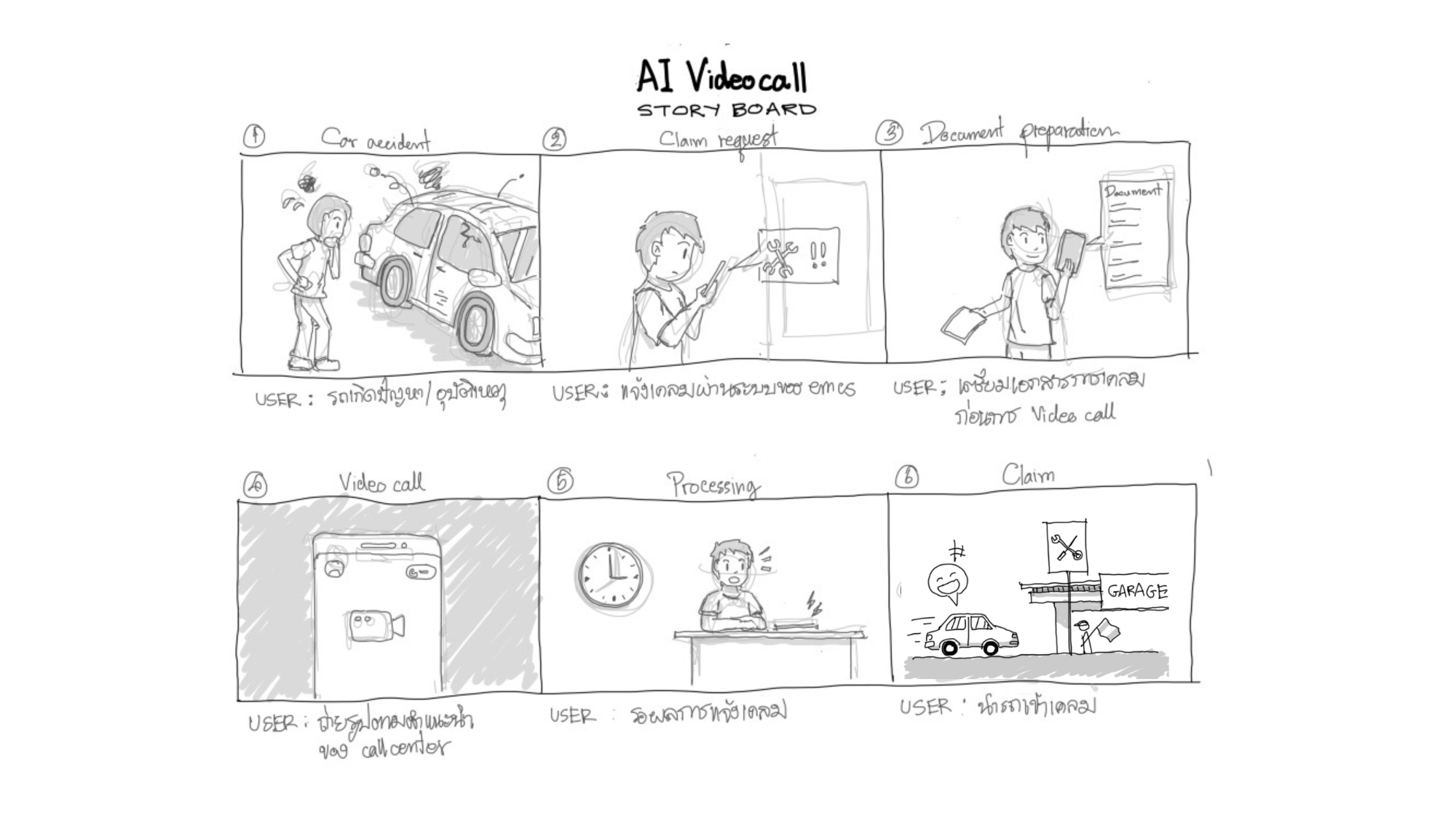
Big picture storyboard
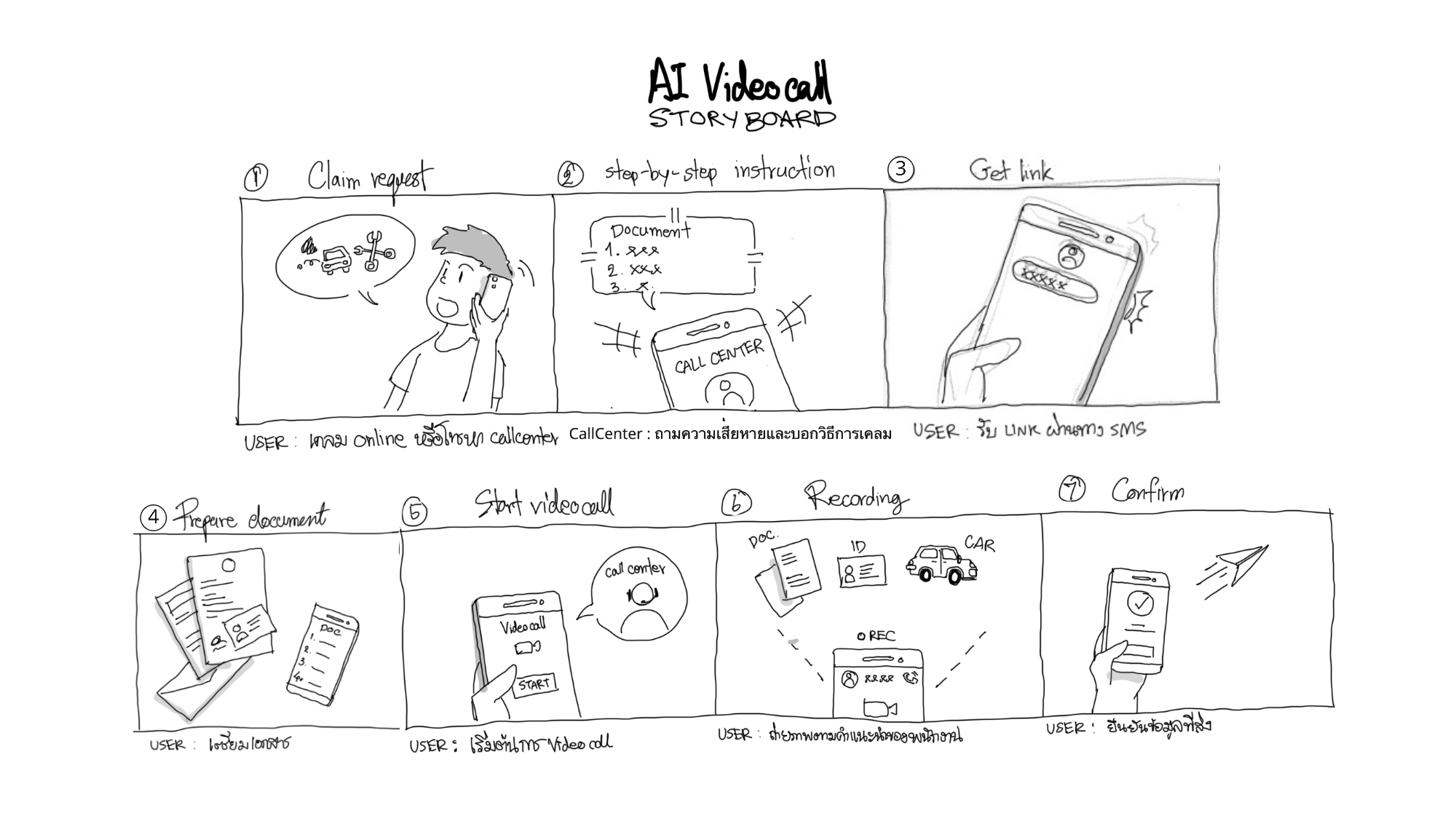
Close-up story board
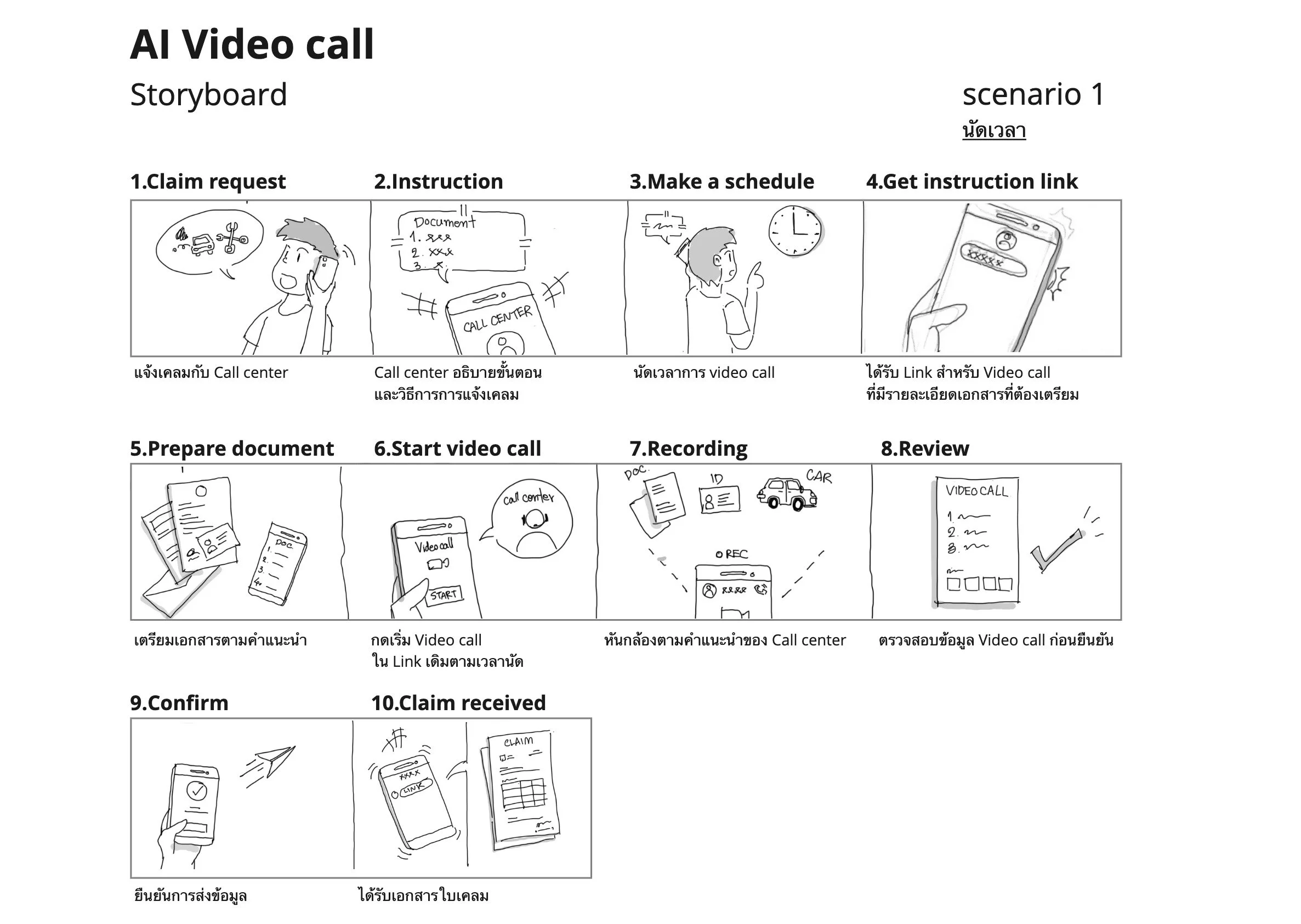
Final story board for stakeholders
Working Out On Customer Journey
The journey went deep into little details with feedback from stakeholders and my colleagues. This customer journey was revised several times and discussed with them regularly at least 2-3 times until everyone was satisfied.
There are 5 parts, aligned from the front end to the back end (top to bottom) of the service when the video conference claim has started.
1. Policyholder (a car owner): This is the user's actions since an accident occurs until the claim process is completed.
2. A web application (for a car owner): This part is for a car owner screen where they interact with the service.
3. Insurance call center: The actions in which inspector from the insurance company interact with their customers.
4. A web application (for inspector): The inspector's working screen when they have a video conference with the user.
5. Backend services: The support system which processes data for this service.
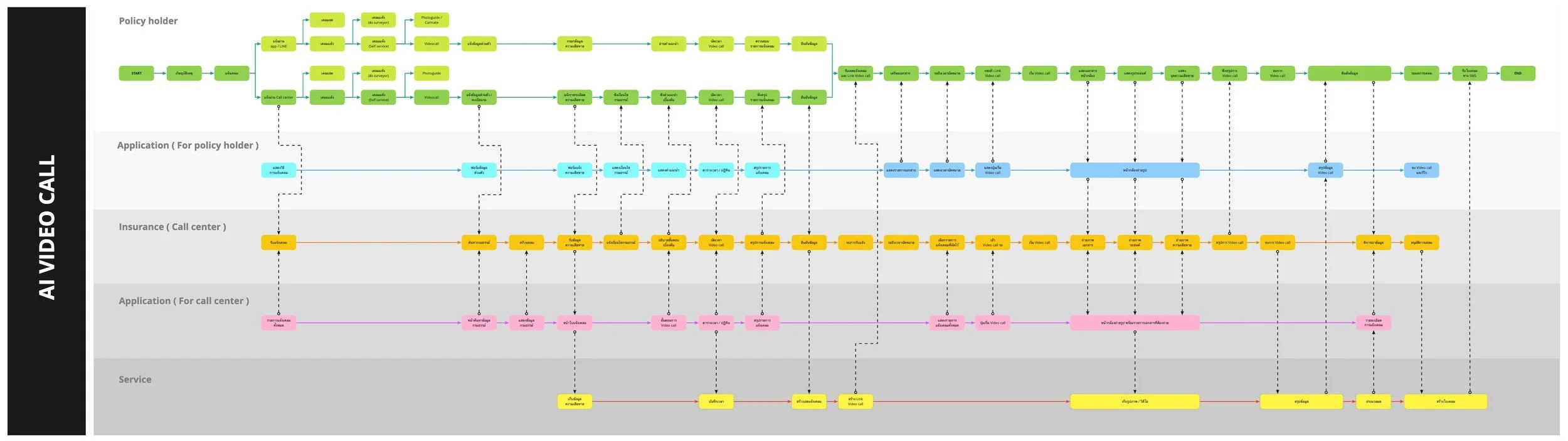
Customer journey with a relation between user and business.
Wireframe and Low-Fidelity Prototype
This product must be used simultaneously on both sides, the user and the inspector, so the screens for the inspector had to be developed as well.
The rough screen designs were made for discussion further with stakeholders on an idea and finding better ways to solve the problems efficiently. Miro was used in this process, for easier to debate and suggest ideas.
Members of the marketing and developer team pinned out their own ideas and discussed each concept for each page. Some ideas were interesting and carried out to the next stage of the design process.
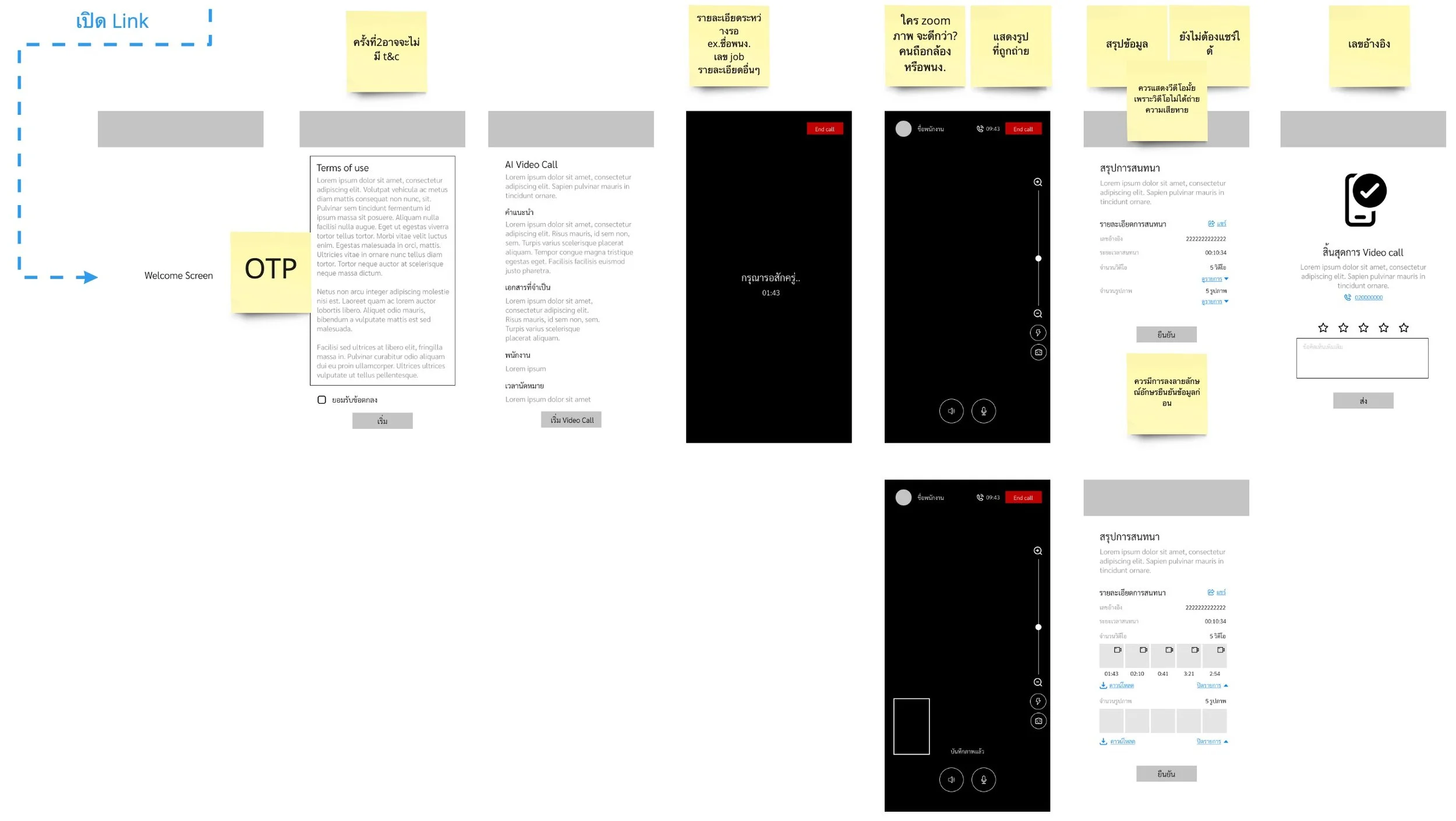
Wireframe of the video conference concept in Miro.
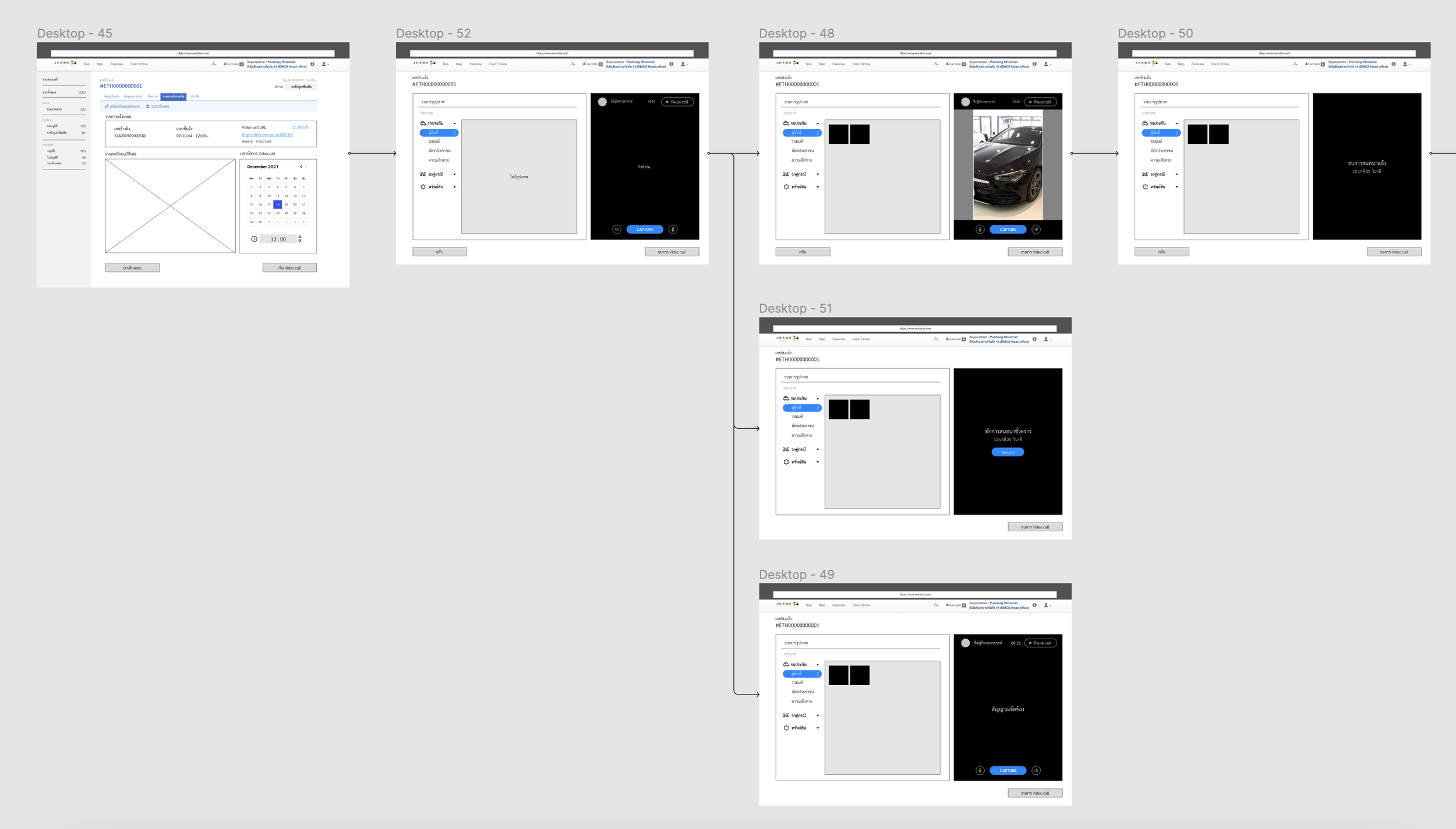
The screens for inspector.
Build a Design System
The design system that I established was a gridline system, color scheme, buttons, icons, and typography.
I used a grind line duplicate of 4px as it is a standard gridline spacing for any design.
The color scheme was made from company identity (CI) which was presented blue as a primary color for this product.
For buttons, I chose buttons that are not too square, and the corners are cut to have a slight curve to make them look contemporary.
The outlined icon was introduced in this project to make the design look soft and modern.
I used a rounded corner for typography to make the design feel less formal.
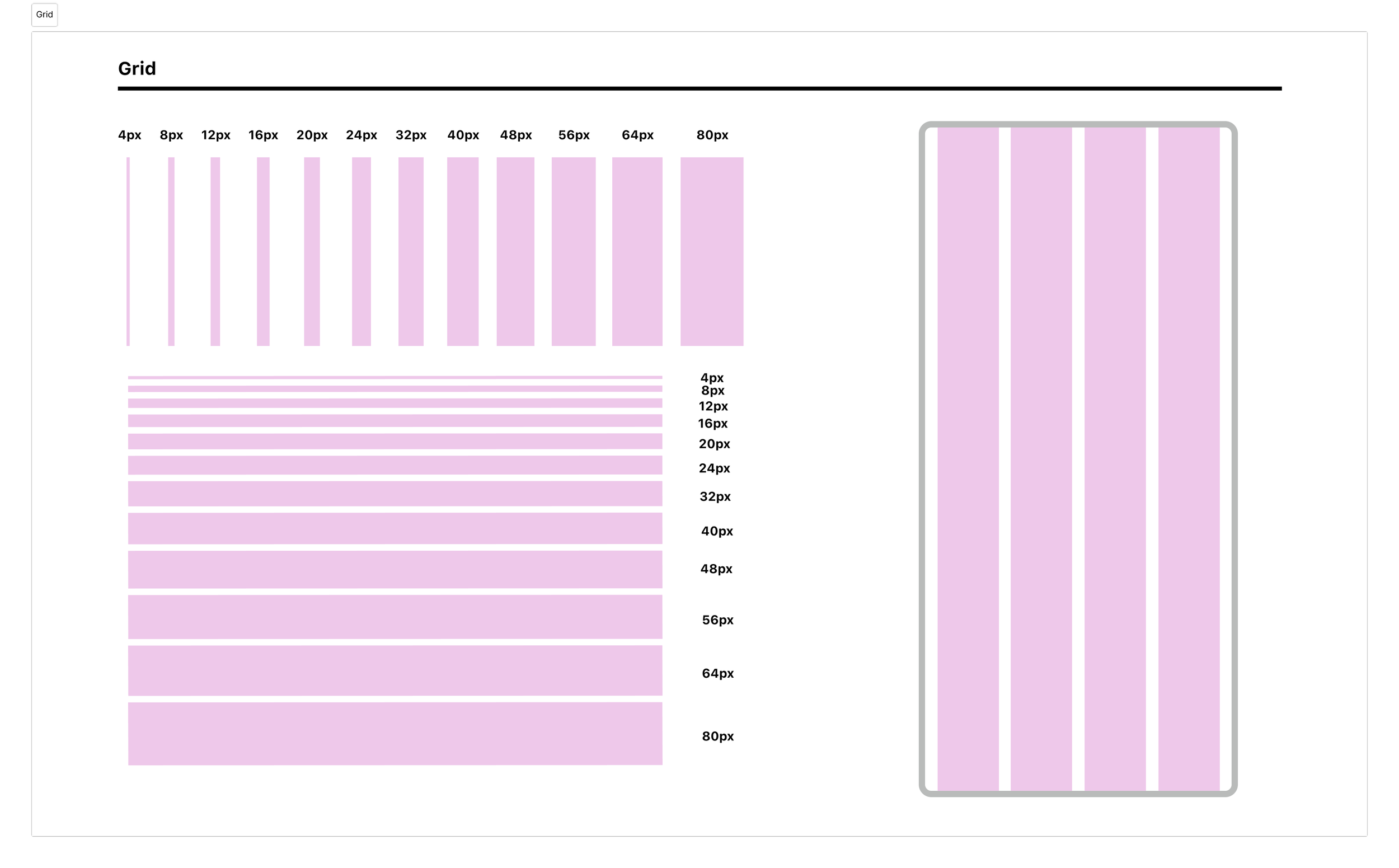
Grid system
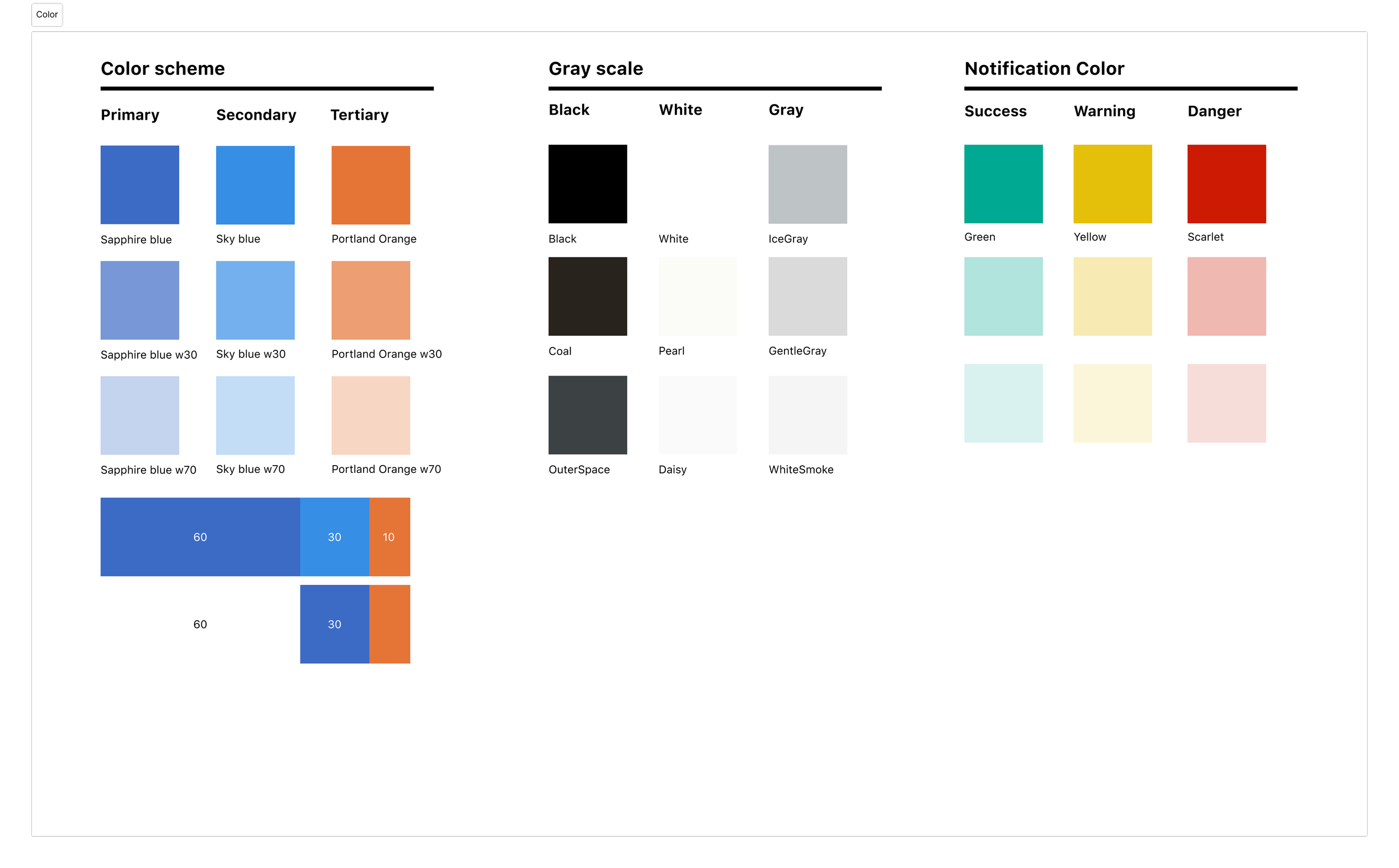
Color scheme
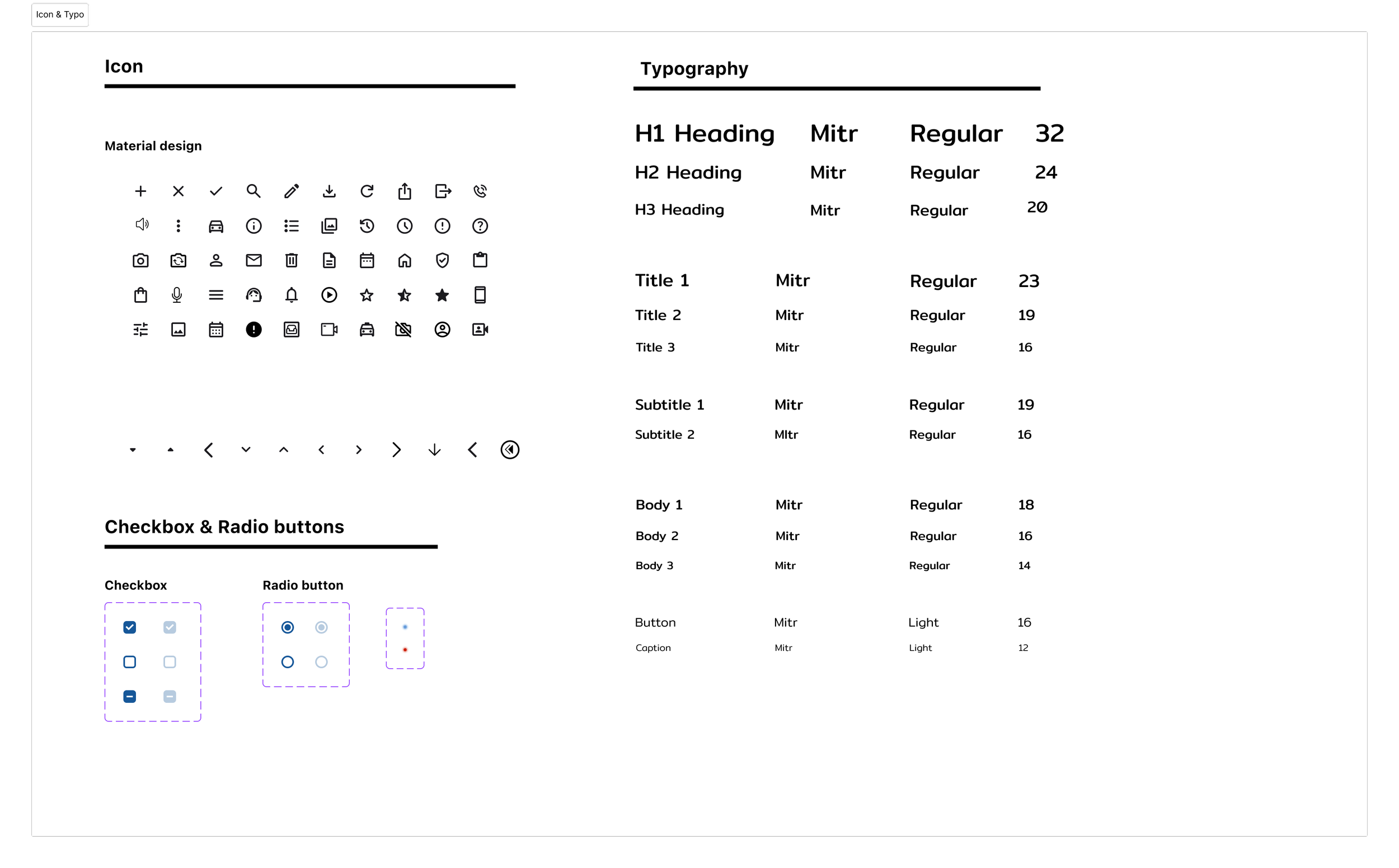
Icon and typography
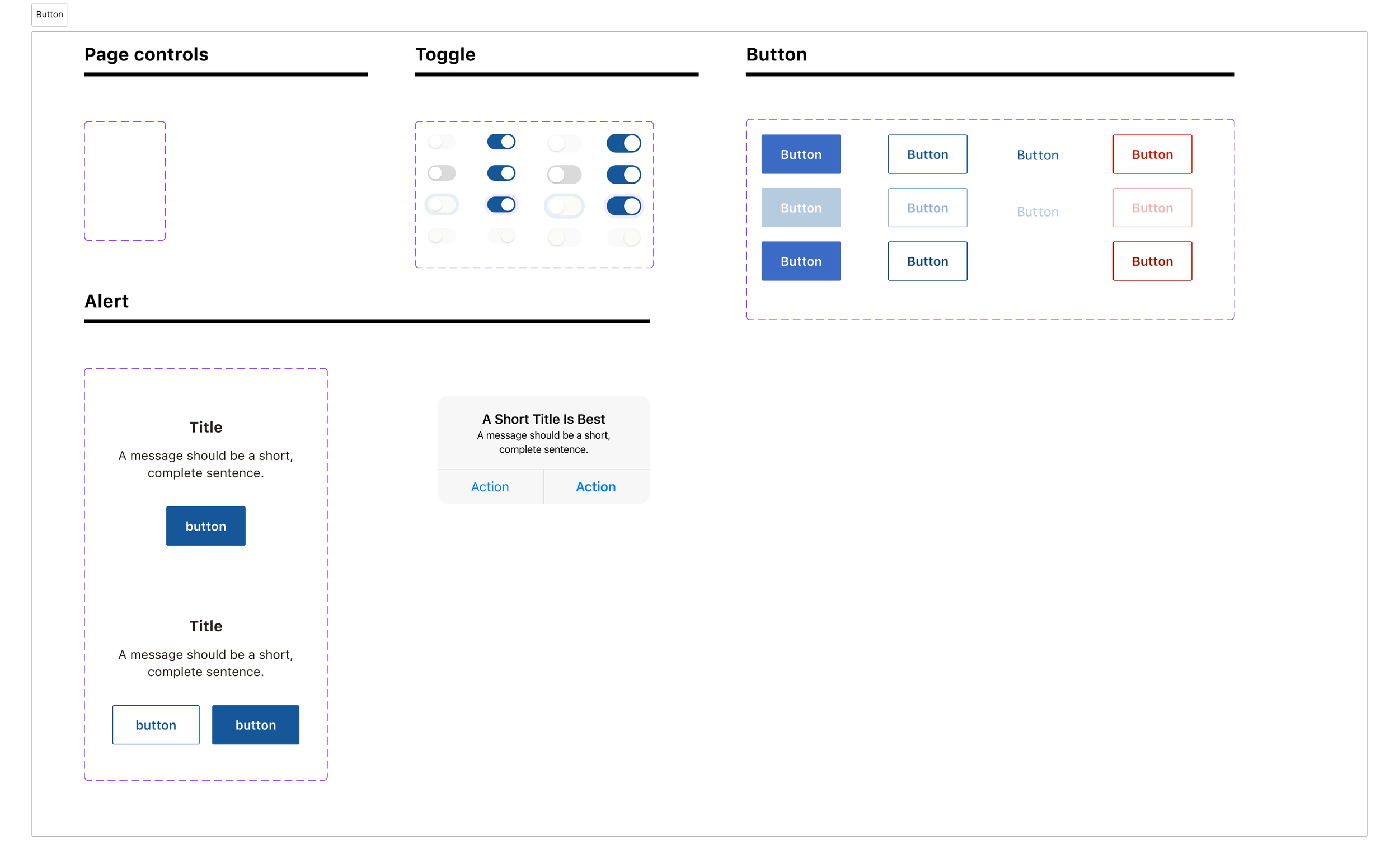
Buttons
High-Fidelity Prototype
A high-fidelity prototype was created because the marketing team needed to know how the service would be processed. This prototype was tested many times. I also got many insightful feedback from my colleagues.
The main points that I wanted from testing.
The order of claim notification from beginning to end is correct.
All required documents have been completely requested.
No leaks of sensitive customer personal data.
The information synced between the two sides is correct.
All necessary information for the use of this product on both sides is sufficient.
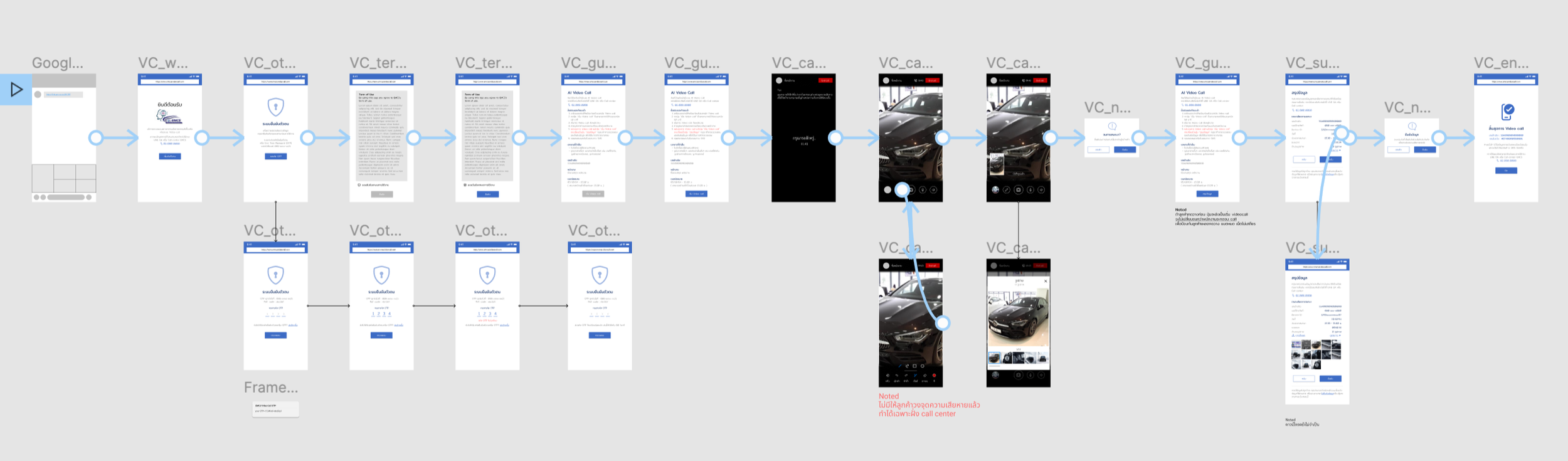
First version of low-fi prototype
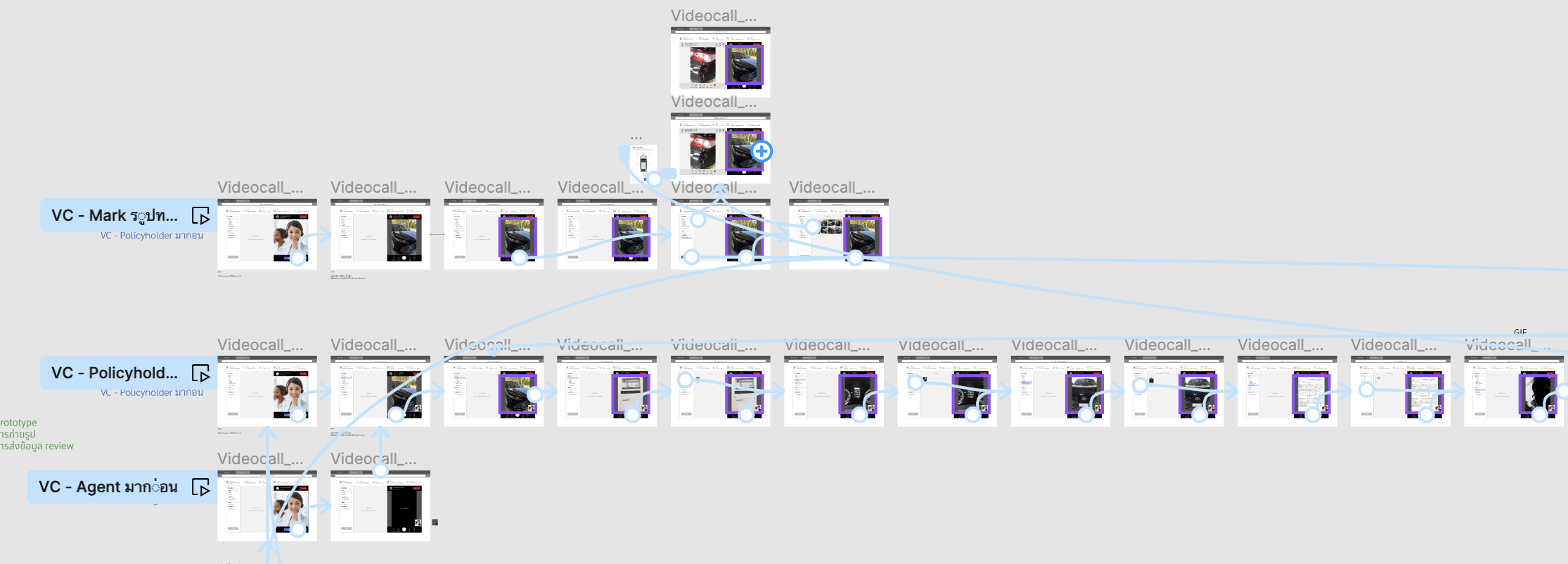
Low-fi prototype for inspector
Find Room for Improvement Through Usability Testing
The study took place after finishing an internal test with stakeholders, the marketing team, and some other team members. The participants are from various statuses to get more insightful feedback from diverse points of view.
The online moderated testing took around 30 minutes each by sending the participants a prototype and telling them about tasks they had to finish.
Insight learned
After conducting usability testing, the result is interesting and valuable. The frequently mentioned problems were pushed to priority 0 (P0), which must be improved first. The latter were referred to as P1, P2, and P3, respectively.
The most informed pain point is the page's information. It's not provided enough to let the user complete the task smoothly. That means we didn't have a good hierarchy to allow the user to focus on the important information. To solve this, I adjusted hierarchy, and proximity, and prioritized the most important information first.
Participants
Users who don’t own a car and are unfamiliar with the car claim system. I needed to test how they could finish tasks without any problems or confusion with words in the product.
Users who drive a car regularly and requested a claim at least once. This group was familiar with a claim system and could give me useful advice for improvement.
For the prototype of the inspector side, I requested users who are proficient in a car claim system for my testing. They could give feedback about services that I might have missed.
Iterate The Designs From Feedback
After I finished analyzing the result of the usability testing, I defined problems and iterated the designs. Some screens had to improve the visual hierarchy, some were wording and messages on the screen that were sent to the users. Not only the screens that have the problems were improved but also the screens, that have feedback and guidance, got an improvement too.
Before and After
Examples of points that have been improved include:
The data was rearranged with more hierarchy to let the user know which information to focus on or pay attention to.
The photos of docume were grouped into sections.
The typography was adjusted to make it clearer and easier to read.
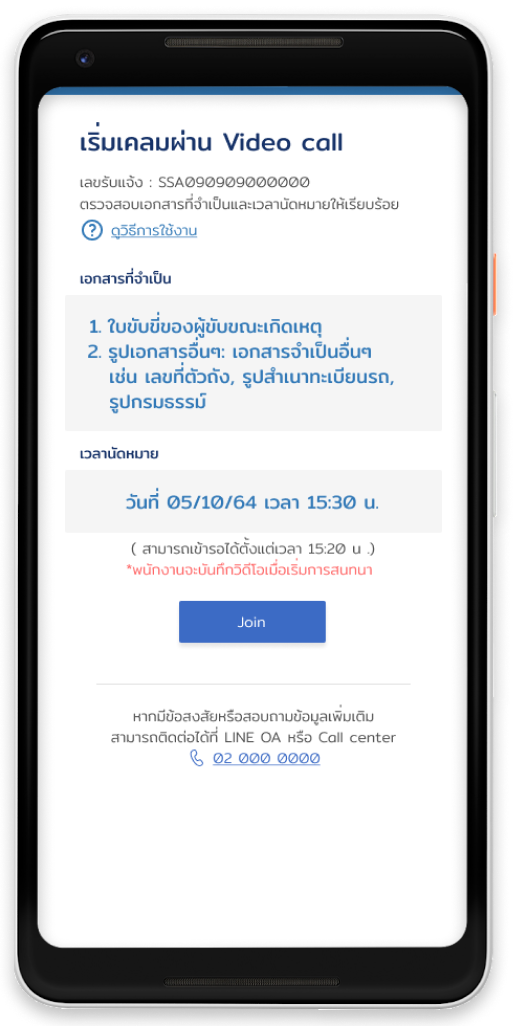
Information before staring a video conference.
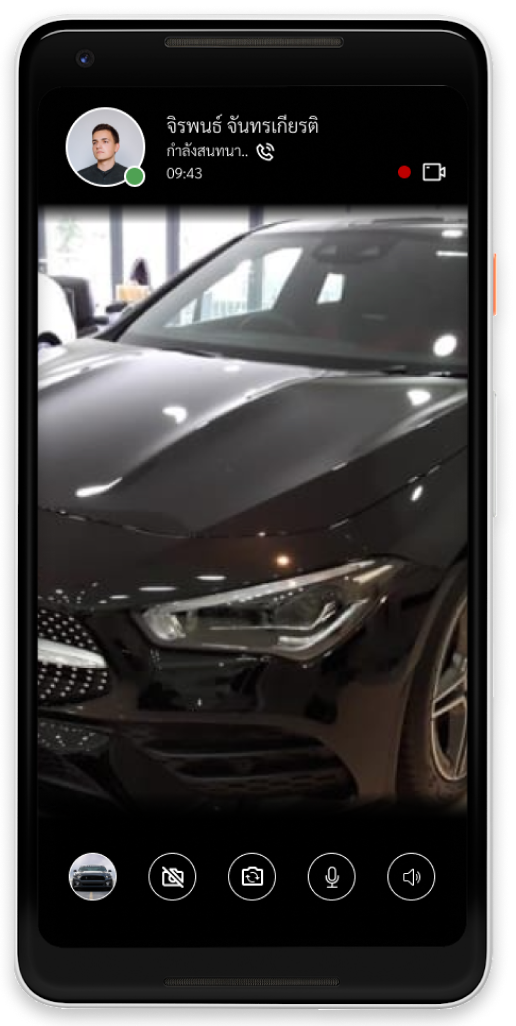
Video conference screen.
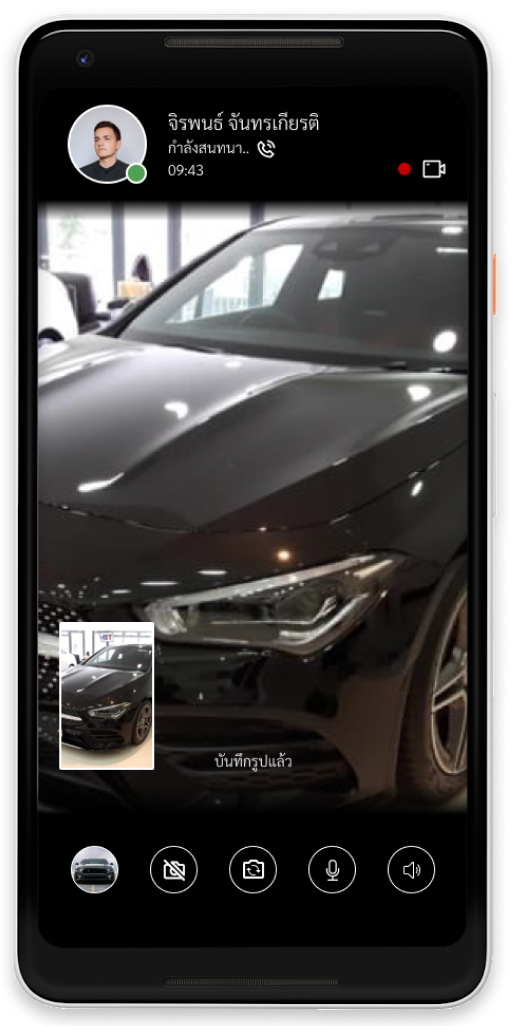
A preview of taken photo.
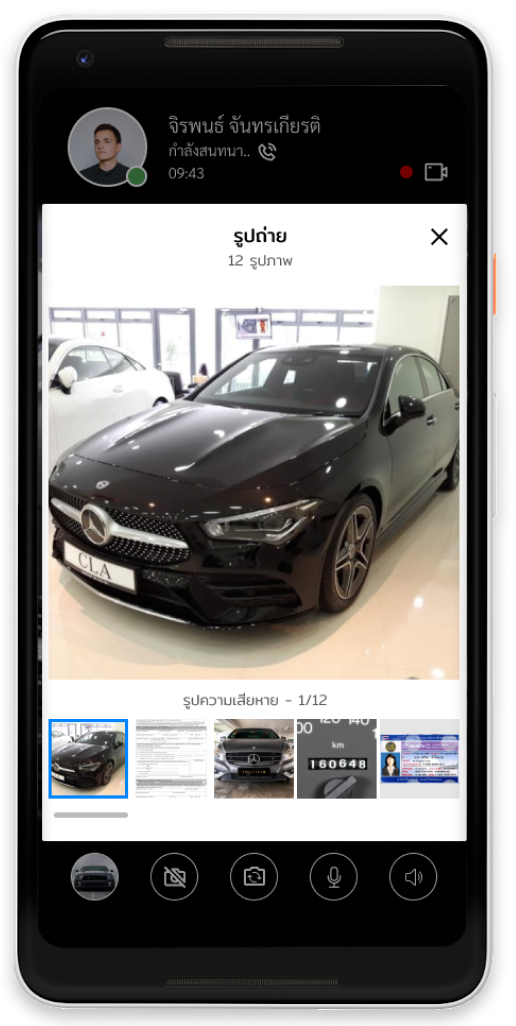
The user can check the taken photos.
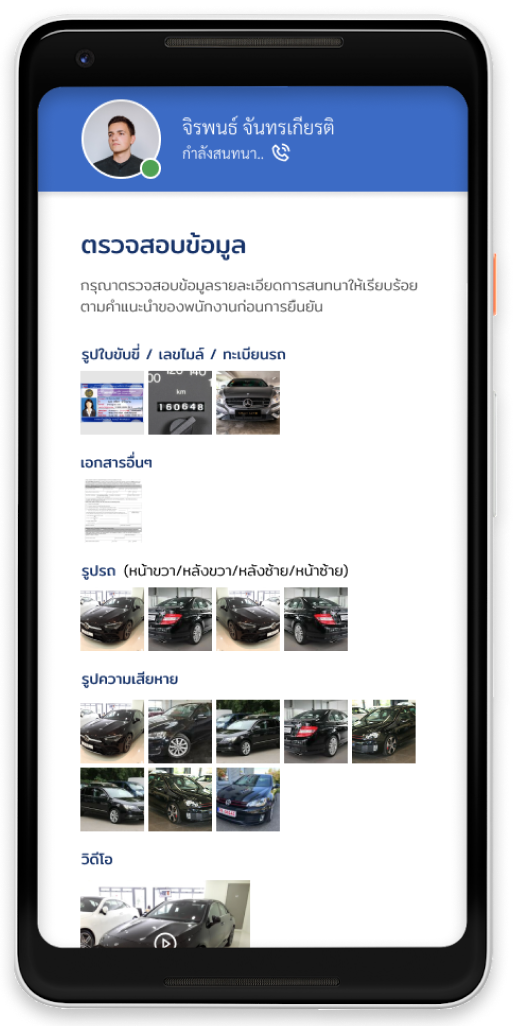
Summary screen for confirmation.
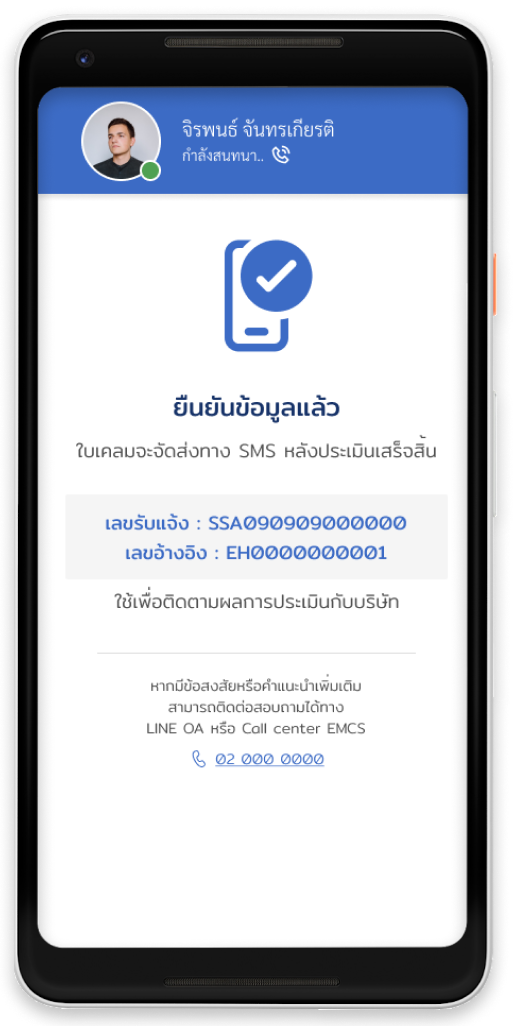
Summary screen with a claim reference number.
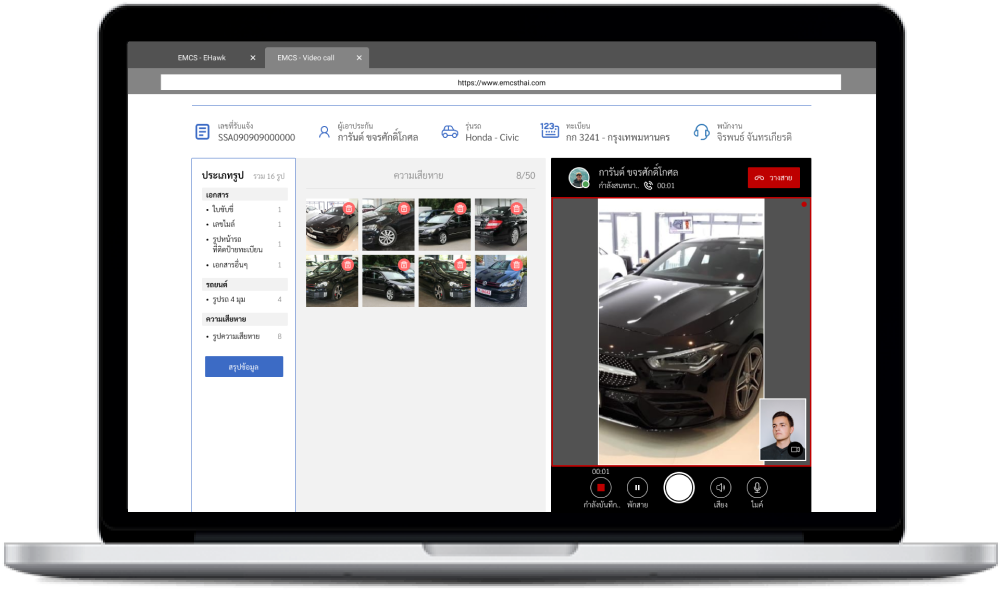
Main working screen for inspector.
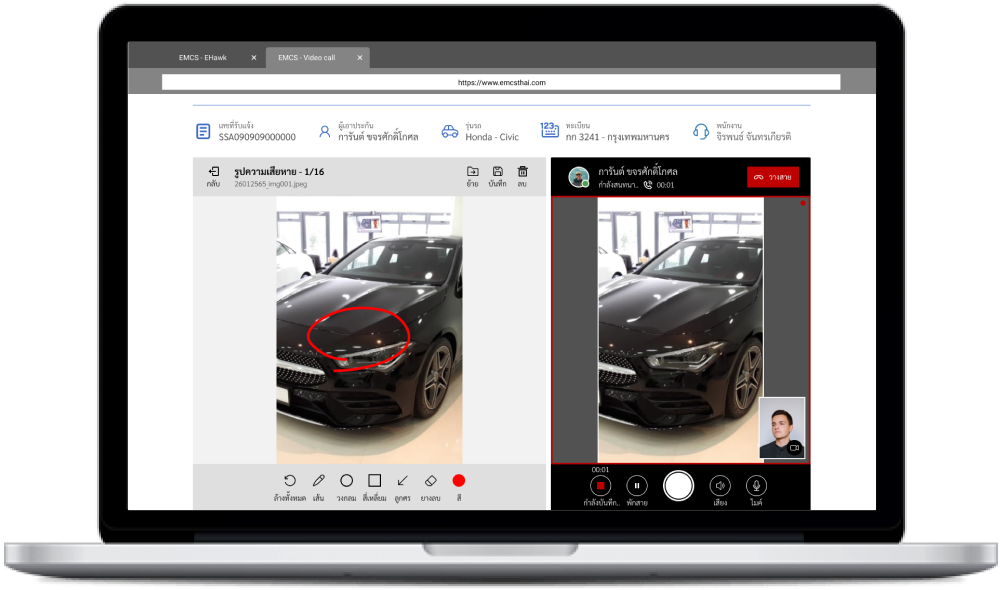
Inspector can mark for a damage by a pen tool.
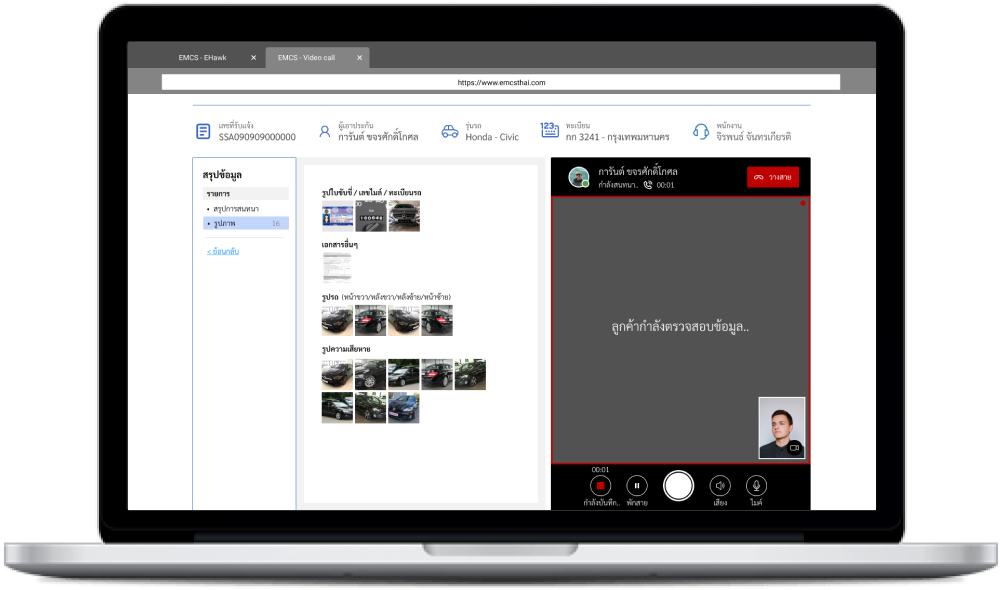
Confirmation screen for inspector.
What I learned
This is a really elaborate project, but it's also interesting to do and learn from. There are a lot of details in the claiming system that need to be focused on carefully, as the insurance company's trustworthiness is really essential.
The overall design of all products must be consistent and represent the brand. Also, the testing should be done when there is a problem, as it helps solve the problem faster than discussing it with team members.